Message Menu
To open a Message shortcut menu:
§ In the Project Tree, right-click the required Message.
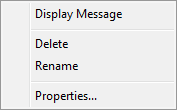
Message Menu
The Message menu has the following options:
|
Option |
Activity |
|
Display Message |
Displays the TerraExplorer message set. See “What is a TerraExplorer Message?” in the “Working with Objects” chapter for more information. |
|
Delete |
Deletes the selected message. |
|
Rename |
Changes the name of the selected message. Enter the new name and press ENTER. |
|
Properties |
Opens the message’s property sheet for editing |
See “Messages and Tooltips” in the “Working with Objects” chapter for further information about TerraExplorer messages.